
TOTPRadius - Purchasing and adding user licenses
TOTPRadius user licenses are per-user and perpetual. Perpetual licenses do not expire, so you can continue to use the appliance as long as you want. Currently, these licenses are including access to product updates within the same version branch and regular technical support. Please note that TOTPRadius comes with 5 free licenses, and you can start using it without purchasing anything. The free 5 licenses remain in the system when you add commercial licenses.How to purchase and generate the license key
The licenses can be purchased online on our web shop. You can choose the number of licenses required and add to the basket. After completing the purchase you will receive an email containing the order page URL. To generate the TOTPRadius user licenses, click on the "generate CAL" button on the order page and provide the Host ID. The license key will be generated and sent to your email address:

The Host ID can be obtained from the Web Admin panel of your TOTPRadius. Navigate to General Settings, then choose License:
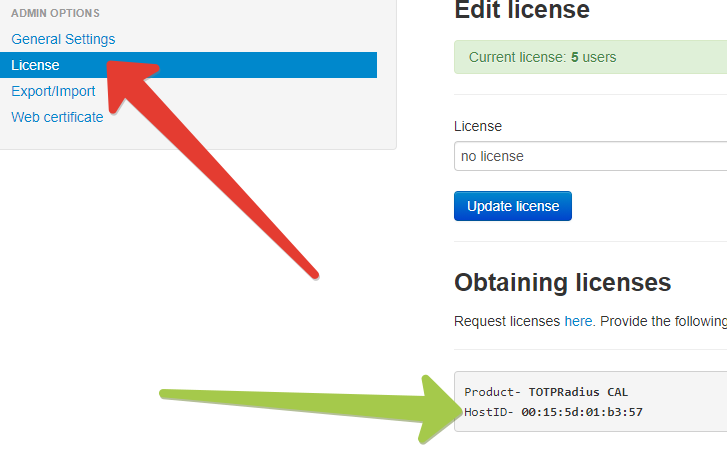
The string next to HostID should be used for generating the client licenses.
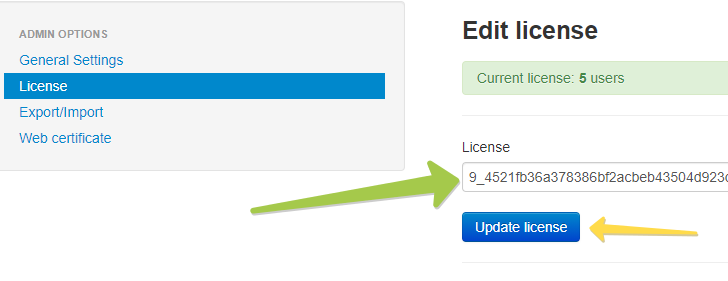
Upon obtaining the license string (which should be in the following format: NNN_[license-hash] , where NNN is the number of licenses purchased allowing to identify the total allowed users without installing the license) you need to add it to the appliance. This is done on the same page (General Settings -> Licenses) as shown below:
- Information to identify your order (ideally your Order ID or Invoice ID, or email address if IDs are not available)
- Previous License Keys and Host IDs
- New License Keys and Host IDs
About
Installation and configuration
- Installation and initial configuration
- Network configuration
- Migrating from older versions
- LDAP Configuration
- Azure AD Configuration
- Self-service enrollment portal
- Web and LDAPS Certificates
- Syslog configuration
- Single-factor authentication exceptions
- Slave appliance mode
- Dynamic RADIUS Attributes
Integration guides
Blog
14-07-2026
token2-fido-bridge: NFC and smartcard FIDO2 devices on Linux
 Linux does not allow using non-USB transport for FIDO2 natively. We're happy to announce token2-fido-bridge, a small open-source tool that finally lets browsers on Linux use FIDO2 credentials stored on NFC and contact smartcards for WebAuthn.
28-06-2026
Libre Key Companion: manufacturer-agnostic security key manager for Android and iOS
 We're happy to announce Libre Key Companion, a new open-source companion application for Android and iOS that lets you manage hardware security keys and smart cards from any manufacturer.
17-06-2026
An open-source, cross-platform way to manage your Token2 keys: Companion App - Rust edition
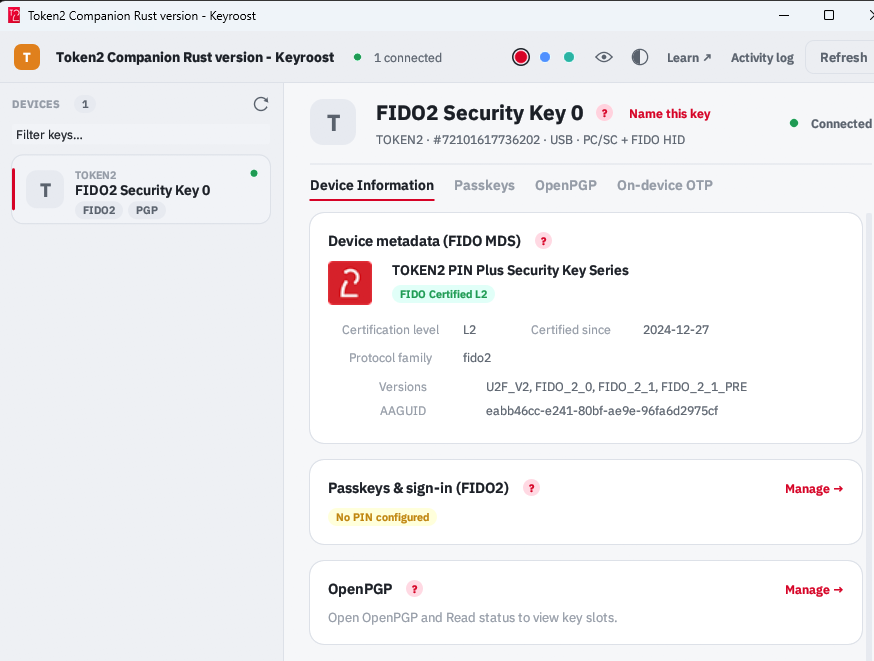 Token2 Companion - Rust edition - an open-source, cross-platform desktop tool for managing Token2 keys, and keys from other vendors too. It runs on Windows, macOS, and Linux, and the whole thing is open source: you can read it, audit it, build it, and extend it.