
TOTPRadius Network configuration
TOTPRadius – standard implementation diagram
The network diagram below is a recommended setup for a single TOTPRadius network (without VPN Web portal interface activated):
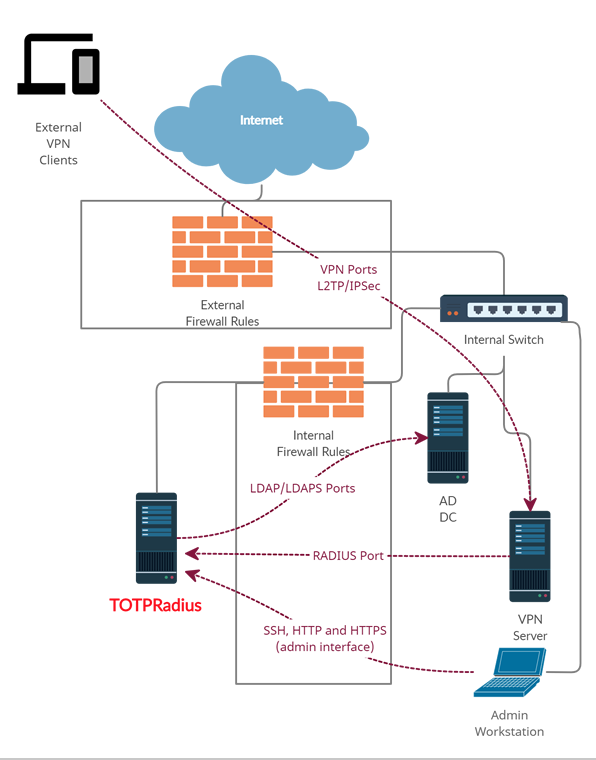
As shown on the diagram, access to TOTPRadius appliance is limited to 3 other hosts only:
- RADIUS port from your VPN server to TOTPRadius appliance (UDP 1812)
- LDAP or LDAPs ports ( TCP 389/636 )from TOTPRadius to your Active Directory Domain controller
- Access to the TOTPRadius management interface ports (SSH, HTTP and HTTPS – tcp 22, 80 and 443) is recommended to be restricted to admin workstations only
TOTPRadius – VPN Web Portal implementation diagram
If you wish to implement FIDO2/Passwordless or Azure AD (Microsoft Entra ID) Oauth2/SSO VPN access for your users (available starting from v0.2.5), there is an additional configuration required in your network layout. The web portal is running as a separate web server on the same virtual appliance, instead of standard https port (443) used for admin interface, the VPN web portal responds on port 9443. This port cannot be used directly for technical reasons, so has to be NATted to port 443.
The network diagram in this case will look like shown below:
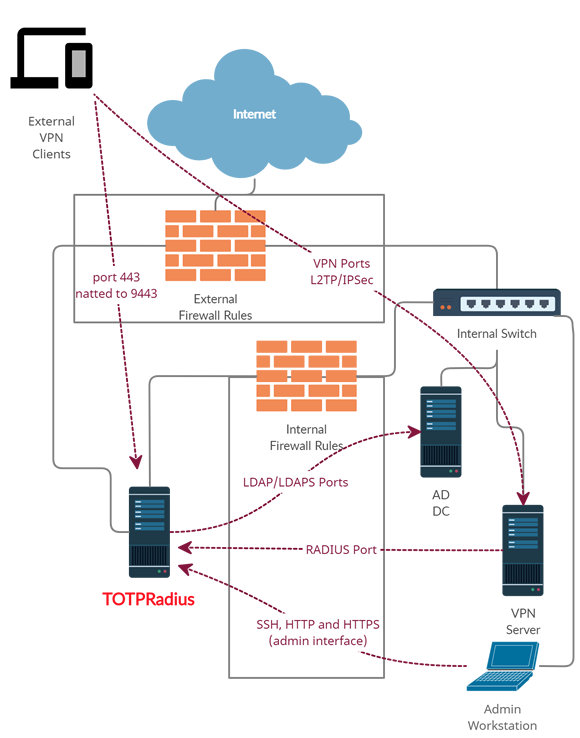
Below is the description of how such NATting can be configured using Meraki MX64 as an example.
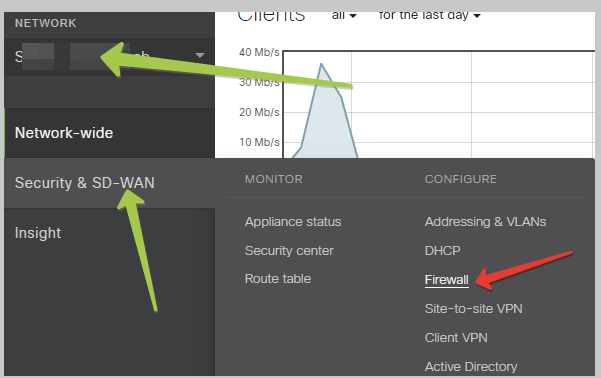
Login to Meraki Cloud Dashboard, and navigate to your Network. Then, navigate to “Security & SD-WAN” and select Firewall
Then, scroll down to 1:Many NAT section and add a NAT rule as shown on the example below
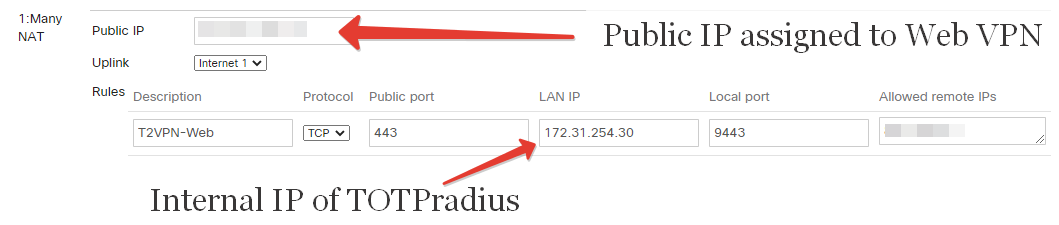
Once this is configured, the VPN Web interface should be accessible from public Internet via https://public_IP/ URL (where public_IP is the one you specified in the 1:Many NAT rule). Leave "Allowed remote IPs" empty or "Any" if you plan to expose the appliance without using any CDN. Please note that both FIDO2 and Oauth2 interfaces require an FQDN with a valid Web Certificate in order to function properly.
About
Installation and configuration
- Installation and initial configuration
- Network configuration
- Migrating from older versions
- LDAP Configuration
- Azure AD Configuration
- Self-service enrollment portal
- Web and LDAPS Certificates
- Syslog configuration
- Single-factor authentication exceptions
- Slave appliance mode
- Dynamic RADIUS Attributes
Integration guides
Blog
14-07-2026
token2-fido-bridge: NFC and smartcard FIDO2 devices on Linux
 Linux does not allow using non-USB transport for FIDO2 natively. We're happy to announce token2-fido-bridge, a small open-source tool that finally lets browsers on Linux use FIDO2 credentials stored on NFC and contact smartcards for WebAuthn.
28-06-2026
Libre Key Companion: manufacturer-agnostic security key manager for Android and iOS
 We're happy to announce Libre Key Companion, a new open-source companion application for Android and iOS that lets you manage hardware security keys and smart cards from any manufacturer.
17-06-2026
An open-source, cross-platform way to manage your Token2 keys: Companion App - Rust edition
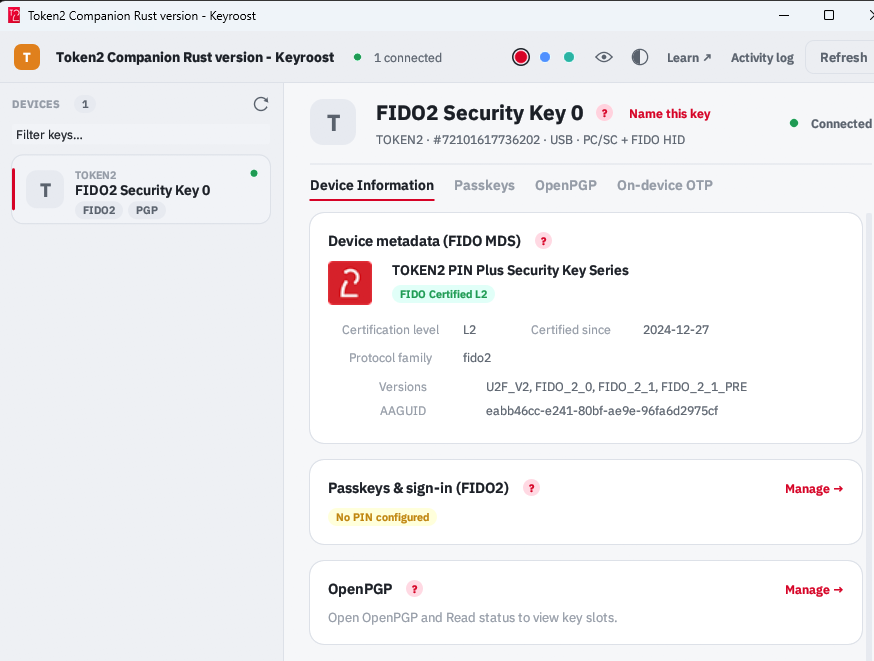 Token2 Companion - Rust edition - an open-source, cross-platform desktop tool for managing Token2 keys, and keys from other vendors too. It runs on Windows, macOS, and Linux, and the whole thing is open source: you can read it, audit it, build it, and extend it.